
Every event manager has stood at the edge of a venue at 9 PM, watching guests line up for the same thing: a photo booth that spits out a slightly-too-bright printout nobody looks at twice. The content problem at Indian events isn’t a lack of cameras — everyone has one in their pocket. It’s a lack of content worth sharing. That gap is exactly what a Glambot for event activation is built to close.
If you’ve scrolled through Instagram Reels over the last year and seen a robotic arm gliding around a guest in slow motion, cape-flip or twirl included, you’ve already seen a Glambot in action. This guide breaks down what it actually is, how event managers are using it — including a recent, high-visibility deployment we’ll walk through in detail, Glambot in Hyundai Crescendo’26 Event — and what to check before you book one for your own event.
What Is a Glambot, Exactly?
A Glambot is a robotic camera arm — the same kind of six-axis arm used in industrial automation, repurposed for entertainment — programmed to move around a guest in a precise, choreographed arc while filming in ultra-slow-motion or high-frame-rate video. The guest strikes a pose, the arm sweeps around them, and within seconds they get a cinematic, red-carpet-style clip instead of a static photo.
That single distinction — motion instead of a still frame — is why a robotic photo booth reads so differently to guests than a regular photo booth kiosk. A photo gets glanced at once. A slow-motion video of yourself looking like you just walked off a film set gets watched, rewatched, and shared. It’s less a photo booth and more a small, self-contained production set, which is exactly how it’s used at most events — usually styled with a red carpet, branded backdrop, and stage lighting, so guests feel like they’ve stepped into a scene rather than queued for a machine.
For brands, that difference translates directly into impressions: every guest who shares their Glambot clip is putting your branding — the backdrop, the step-and-repeat panel, the event name — in front of their own network, for free, in a format people actually watch to the end.
How a Glambot Works at a Live Event
The mechanics are simple from the guest’s side, even though there’s real engineering behind it:
- Step 1 — Arrival: The guest steps onto a marked spot in front of a branded backdrop, usually framed by a red carpet and stanchions to signal “this is the moment.”
- Step 2 — Pose: A brief cue tells them how long to hold their pose — a few seconds is enough.
- Step 3 — Capture: The robotic arm sweeps around the guest along a pre-programmed path, capturing the shot as a smooth, cinematic slow-motion video booth clip.
- Step 4 — Instant Share: The finished video is ready almost immediately — for WhatsApp, Instagram, or a branded event gallery.
Because the arm’s path is programmable, operators can adjust the sweep, speed, and framing to match the event — tighter and faster for a high-energy brand activation, slower and more deliberate for a formal corporate gala or a wedding entrance.
Why Corporate Events Are Turning to Glambot
Glambot for Corporate Event bookings have grown for a straightforward reason: corporate budgets are shifting away from static branding (banners, standees) and toward guest experiences that generate their own content. A Glambot does both at once — it’s a visible brand touchpoint on the show floor, and every clip it produces carries the event’s branding out into guests’ personal social feeds.
We’ve seen this play out across very different corporate formats:
- At Pantan 2026, Mankind Pharma’s Telmikind Therapeutic Wheel launch, the robot photo booth wasn’t a side attraction — it was part of how the brand got healthcare professionals and attendees actively engaging with a product launch that could easily have felt clinical and forgettable.
- At NDTV’s Indian of the Year event and a TCS corporate gathering in Goa, the Glambot delivered what we’d call “cinematic slow-motion moments” for a guest list that expects polish, not a plastic photo-booth frame.
- At the Nykaa Fashion x Underneat collaboration launch in Delhi, the same technology was tuned for a fashion-forward, e-commerce audience — proof that “corporate” doesn’t mean the activation has to look stiff.
The common thread across all three: the brand didn’t have to explain the activation to guests. People know what to do when they see a red carpet and a camera arm — they walk up and perform for it, unprompted.
Case Study: Glambot in Hyundai Crescendo’26 Event
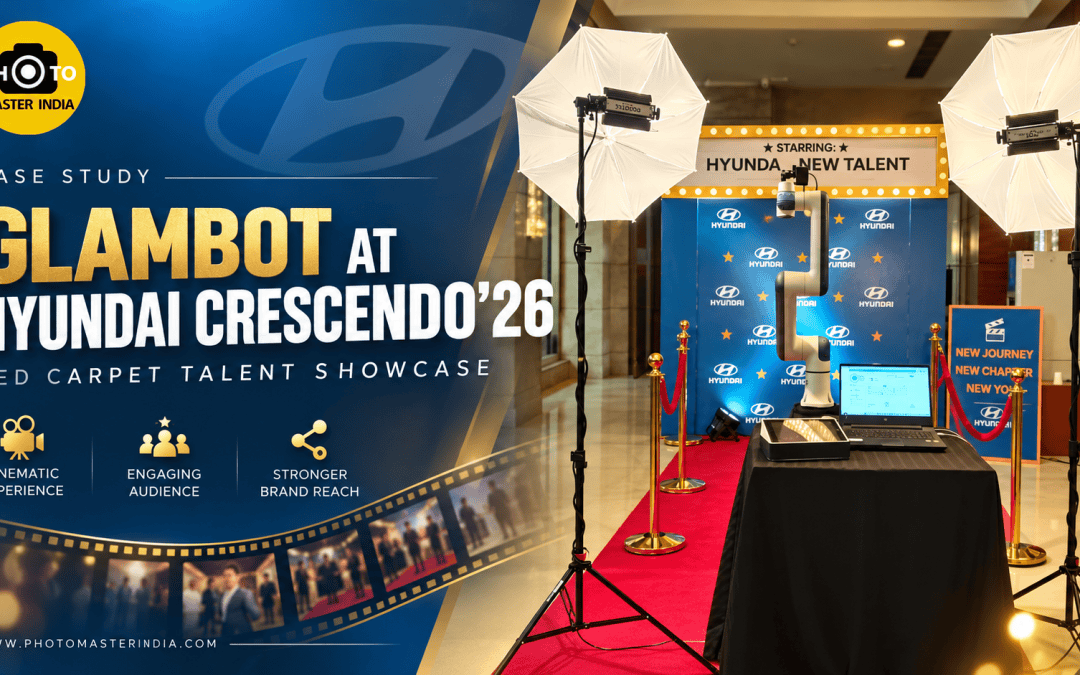
One of the more distinctive recent examples of this is Glambot in Hyundai Crescendo’26 Event — an internal talent and recognition program Hyundai ran under a full movie-premiere theme.
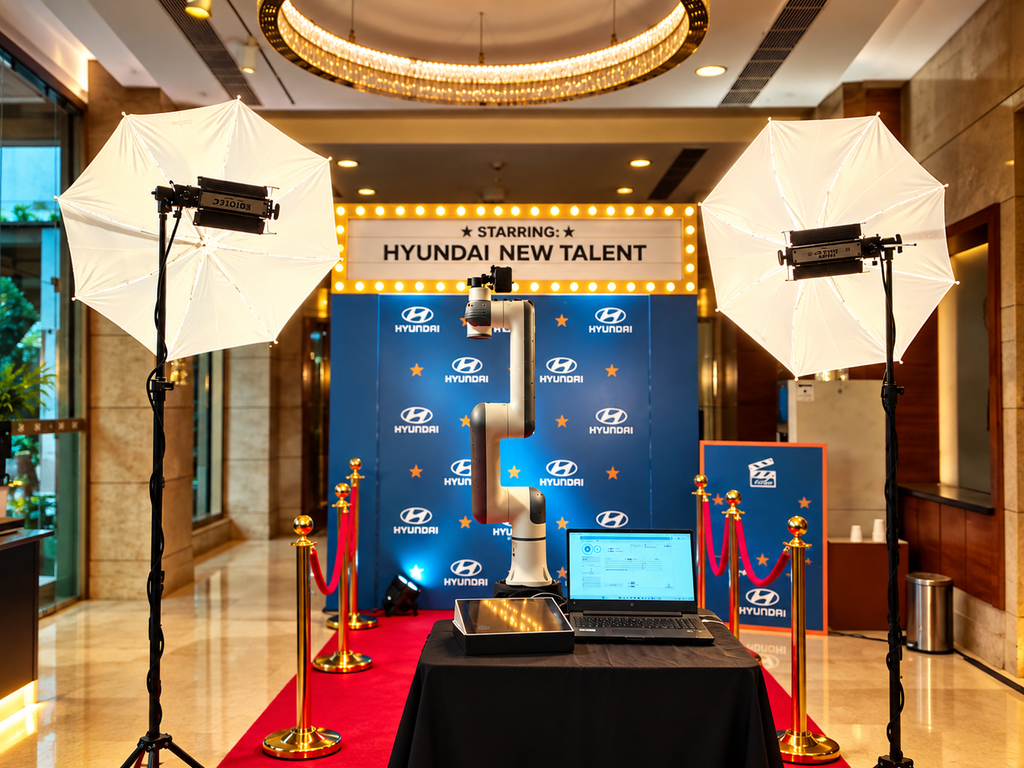
The activation leaned all the way into the concept. A red carpet ran from the entrance to a Hyundai-branded step-and-repeat backdrop, flanked by gold stanchions and red rope — the same visual language as an awards-night arrivals line. Above the setup, a marquee-style sign read “Starring: Hyundai’s New Talent,” with a clapperboard graphic reinforcing the film-set framing. Supporting signage carried the event’s message directly: “New Journey, New Chapter, New You” and “Welcome to the Spotlight.”
The Glambot itself was positioned as the centerpiece of that “set” — mounted on a draped console table alongside the operator laptop and guest-facing tablet, lit by two large softbox lights positioned on either side to give every participant even, flattering light regardless of the time of day inside the venue. That lighting detail matters more than it looks: a robotic arm shot lives or dies on how the subject is lit, since the whole point is a clean, cinematic result guests want to share.
What makes this a useful reference case for other event managers isn’t just the visual execution — it’s the concept fit. Hyundai wasn’t using the Glambot to promote a car. It was using it to make employees feel like the “talent” in their own recognition story, which is a very different brief from a product launch or a wedding. It’s a good illustration of how flexible a Glambot for event activation can be: the hardware doesn’t change, but the theme, signage, and lighting setup around it can be rebuilt entirely to match the story a brand wants to tell.
Where Else Glambot Fits: Weddings, Product Launches & Brand Activations
Corporate events aren’t the only place this technology earns its keep:
- Sports and brand activations — during the Delhi FIFA World Cup Trophy Tour, the Glambot gave fans a way to turn a once-in-a-lifetime moment (standing near the actual trophy) into a keepsake video, not just a phone photo lost in a camera roll.
- Luxury weddings — in Udaipur’s destination wedding season, Glambot is frequently paired with an AI Sketchbot station, giving guests two very different kinds of keepsakes at the same event: a cinematic video and a hand-drawn portrait.
- Multi-day festivals and general events — as seen across various Goa events, where a Glambot sits alongside iPad and 360-degree booths to give guests a choice of formats.
The pattern across all of these: wherever there’s a “moment” worth marking — a trophy visit, a wedding entrance, an employee spotlight — a Glambot gives it a shareable, cinematic form.
Should You Rent Glambot or Buy One?
For the overwhelming majority of event managers, the answer is simple: rent Glambot rather than buy. Here’s why that math almost always works out in favor of renting:
- The hardware is expensive and specialized. A six-axis robotic arm with event-grade camera and lighting integration isn’t something most companies use often enough to justify owning outright.
- Operation isn’t plug-and-play. Programming a smooth, safe sweep path around a guest takes calibration and experience — get it wrong and the result looks jerky instead of cinematic.
- Software and templates evolve. Overlay branding, output formats, and sharing integrations (WhatsApp delivery, QR-code galleries) get updated regularly by vendors who run these full-time; a one-off purchase quickly falls behind.
- You need someone accountable on the day. An experienced operator troubleshoots on the spot — lighting shifts, guest flow, technical hiccups — none of which you want to be learning in real time at your own event.
Renting also means you’re only paying for the activation on the days you actually need it, which is the model almost every case study above follows.
How to Choose the Right Glambot Vendor
Not all Glambot vendors run the same setup, and the difference shows up in the final footage. Before booking, check for:
- A real portfolio, not just stock demo clips. Ask to see footage from actual past events, ideally in a format similar to yours (corporate, wedding, brand activation).
- On-site operator support. A vendor who sends a trained operator — not just a box of equipment — is the difference between a smooth activation and a stalled queue.
- Lighting setup included. As the Hyundai Crescendo’26 setup shows, proper lighting (not just the robot arm) is what makes the output look premium rather than washed out.
- Custom branding on backdrops, overlays, and signage. A generic backdrop undercuts the whole point of the activation; a good vendor builds the visual set around your brand.
- Fast turnaround for guest sharing. Guests want their clip in seconds, not emailed the next day — confirm the delivery method (WhatsApp, on-screen QR code, instant gallery) before the event.
- Pan-India availability and logistics experience. If your event isn’t in a major metro, ask directly whether the vendor has handled setups in that city or region before.
Common Mistakes When Booking a Glambot for Your Event
- Treating it as an afterthought booth. Placing the Glambot in a low-traffic corner kills its biggest asset — the fact that people stop to watch others use it, which pulls in a queue on its own. It needs to be positioned where footfall naturally flows past it.
- Skipping the branding brief. Vendors can build backdrops, overlays, and signage around your event’s theme — but only if you share brand guidelines, colors, and messaging in advance, not on setup day.
- Underestimating queue management. Each guest’s clip takes a short but real amount of time; for large guest counts, ask your vendor about running two stations or extending operating hours.
- Assuming every Glambot vendor offers the same output quality. Arm speed, camera resolution, and lighting rigs vary a lot between operators — a cheaper quote sometimes means a visibly cheaper-looking result.
- Forgetting the share moment. The activation’s ROI depends on guests actually posting their clips — confirm the delivery format is fast and frictionless before the event, not during it.
Pro Tips From the Field
A few things experienced operators do differently, based on what consistently separates a forgettable activation from one people talk about after the event:
- Match the lighting to the venue, not just the booth. Two softbox or umbrella lights flanking the capture zone — as used at the Hyundai Crescendo’26 setup — neutralize harsh venue lighting or dim ballroom conditions, keeping every guest’s footage consistent regardless of when they show up.
- Give the backdrop a story, not just a logo wall. A repeating logo pattern works, but adding a themed marquee, signage, or a tagline (the way “Starring: Hyundai’s New Talent” did) gives guests a reason to pose differently than they would at a plain step-and-repeat.
- Brief guests in one sentence. The best results come from a quick, confident cue from the operator — “hold for three seconds, we’ll do the rest” — rather than leaving guests unsure of what to do.
- Plan the queue path, not just the booth spot. A red carpet or rope line does double duty: it builds anticipation and keeps the queue orderly without needing a staff member constantly managing it.
- Test the share flow before doors open. WhatsApp delivery, QR codes, and on-screen galleries all depend on venue Wi-Fi or local network setup — confirm this during vendor load-in, not after the first guest is waiting.
Glambot vs. Traditional Photo Booth
| Traditional Photo Booth | Glambot | |
| Output | Static photo/print | Cinematic slow-motion video |
| Guest involvement | Pose and wait for a print | Pose while the arm captures a moving shot |
| Shareability | Low — photos are rarely reshared | High — video clips get watched and reshared |
| Crowd draw | Moderate | Strong — the robotic arm itself draws a queue |
| Branding flexibility | Frame or backdrop only | Backdrop, lighting, signage, and overlay branding |
| Best suited for | Casual, high-volume events | Premium brand activations, corporate events, weddings |
Final Thoughts
A Glambot for event activation works because it solves a problem event managers have quietly lived with for years — guests leaving with content that never gets watched twice. Whether it’s a product launch like Pantan 2026, a global sports moment like the FIFA World Cup Trophy Tour, a destination wedding in Udaipur, or an internal recognition event like Glambot in Hyundai Crescendo’26 Event, the same hardware adapts to a completely different story each time, as long as the branding, lighting, and vendor experience behind it are right.
If you’re planning an event and want guests to walk away with something they’ll actually watch and share — not just something they picked up — it’s worth looking at what a properly run Glambot setup can add to your event lineup.
Contact Photo Master India to rent Glambot for your next event.
Frequently Asked Questions
What is a Glambot and how is it different from a 360-degree photo booth?
A Glambot uses a robotic camera arm that moves around the guest in a programmed arc to capture cinematic slow-motion video, while a 360-degree booth typically uses a rotating camera rig on a fixed circular track. In practice, a Glambot’s arm gives operators far more control over angle, height, and movement speed, which is why the footage tends to look more like a produced film shot than a spinning-camera effect. We’ve found guests also engage differently with each — a 360 booth invites big group shots, while a Glambot tends to draw solo or couple “hero” moments, since the framing feels more personal and deliberate.
How much does it cost to rent a Glambot for an event in India?
Pricing depends on event duration, city, guest count expectations, and how much custom branding (backdrop design, overlays, signage) is involved — a straightforward few-hour booking in a metro city costs less than a multi-day destination event with full custom theming, like the setups built for Udaipur weddings or large corporate activations. The most reliable way to get an accurate number is to share your event date, city, expected footfall, and branding needs directly with a vendor, since generic per-hour rates rarely account for setup and travel logistics.
Is Glambot only for weddings, or does it work for corporate events too?
It works well for both, and the difference is entirely in how it’s styled rather than the hardware itself. For corporate events, vendors typically build the backdrop, lighting, and signage around brand guidelines and event messaging — as seen in the Pantan 2026 product launch, the NDTV and TCS event in Goa, and the Hyundai Crescendo’26 employee recognition event. For weddings, the same arm and camera setup gets a softer, romantic styling, often paired with an AI Sketchbot for a second type of keepsake.
How was Glambot used in the Hyundai Crescendo’26 event specifically?
At Crescendo’26, Hyundai built a full movie-premiere concept around the Glambot rather than treating it as a standalone booth. A red carpet led guests to a Hyundai-branded backdrop under a marquee reading “Starring: Hyundai’s New Talent,” with the Glambot positioned as the centerpiece and lit by two softbox lights for consistent, premium-looking footage. The activation supported an employee recognition theme — “New Journey, New Chapter, New You” — turning what could have been a standard internal event into a red-carpet moment for staff being recognized.
Which cities does Photo Master India cover for Glambot rental?
Photo Master India runs Glambot activations across major Indian cities and destination event hubs, including Delhi NCR, Mumbai, Bangalore, Hyderabad, Chennai, Kolkata, Gujarat, Udaipur, and Goa, based on past deployments at events like the Delhi FIFA World Cup Trophy Tour, Gujarat’s Pantan 2026 launch, Goa’s premium corporate events, and Udaipur’s destination weddings. For a city not listed here, it’s worth checking directly, since availability is generally pan-India rather than limited to a fixed set of locations.