
Retail promotions have a problem nobody likes to say out loud: shoppers walk past them. A standee, a discount banner, maybe a spin-the-wheel counter — people glance, take a leaflet, and keep walking. For a premium apparel brand, that’s worse than no activation at all, because it makes a polished label look ordinary.
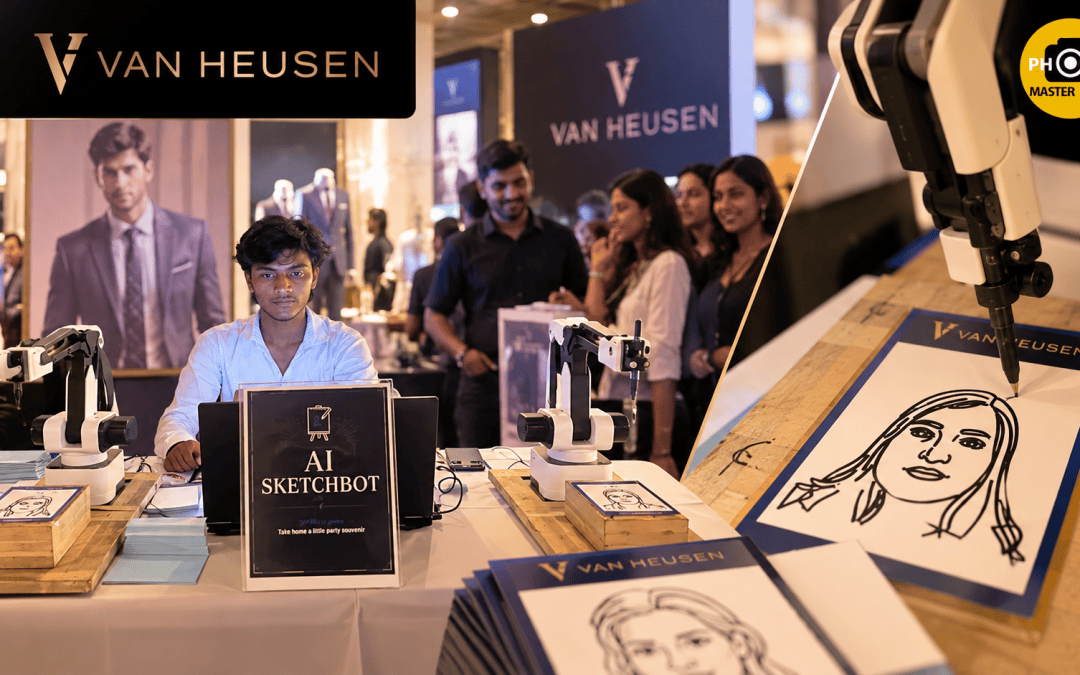
That was the brief we walked into at the Van Heusen Promotion Event in Bangalore. The brand wanted people to stop, spend a few minutes with it, and leave holding something they’d actually keep. Our answer was an AI Sketchbot for event activation — a robotic arm that draws each guest’s portrait live, with a real pen on real paper, in front of them.
This post walks through how that activation was planned, what happened on the floor, what we’d do differently, and what anyone looking to rent AI Sketchbot in Bangalore should check before booking.
What an AI Sketchbot Actually Does (and Why It Works at Promotions)
An AI Sketchbot is a robotic portrait artist. A camera takes the guest’s photo, AI software converts that photo into a line-art sketch, and a robotic arm then draws that sketch stroke by stroke with a pen on card or paper. The whole thing happens in front of the guest.
The finished product isn’t the whole point — the process is. People watch the arm build their face line by line, and so do the people standing behind them. That’s the part that makes it work at a brand promotion:
- It creates dwell time. A portrait takes a few minutes. That’s a few minutes a shopper is standing in your branded zone, not walking past it.
- It draws a crowd on its own. A moving robot arm is visible from across a floor. Nobody needs to be told to come and look.
- The takeaway is physical and personal. A printed coupon gets thrown away. A hand-drawn portrait of yourself goes on a desk or a fridge — often with the brand’s logo on the card.
Compared with a photo booth or a Glambot, the Sketchbot is slower and more intimate. A Glambot gives you a quick, cinematic video clip; a Sketchbot gives you a quiet, “watch this happen” moment. For a retail promotion where the goal is time spent with the brand, that slower pace is an advantage, not a weakness.
Case Study: AI Sketchbot at the Van Heusen Promotion Event in Bangalore
The Brief
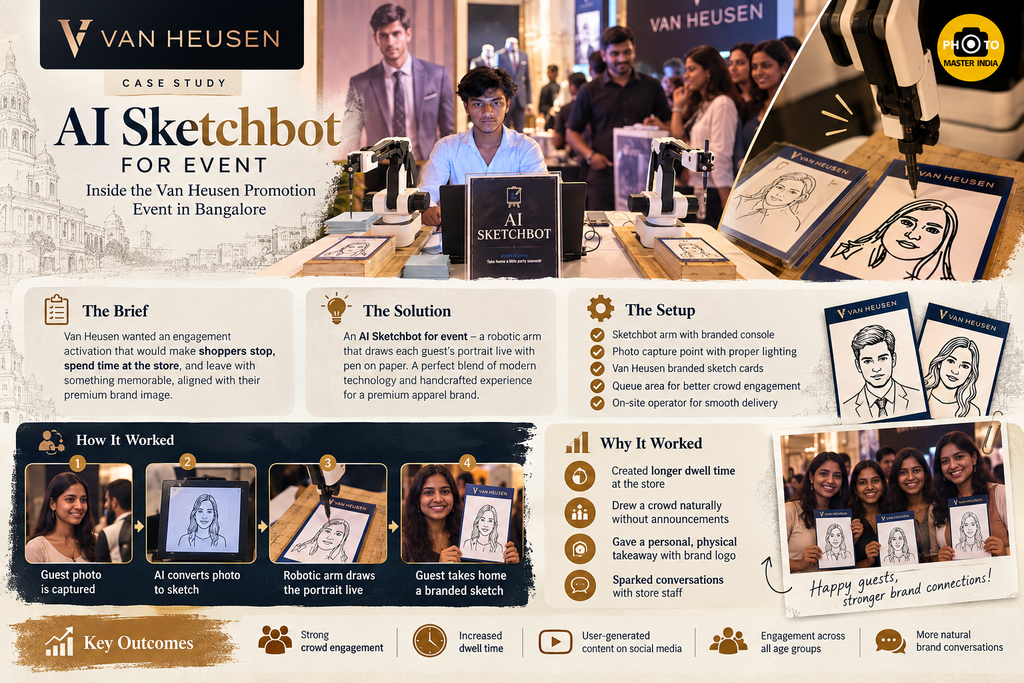
Van Heusen is a formal- and smart-wear label with a well-built premium image. For the Van Heusen Promotion Event in Bangalore, the brand needed an engagement piece that matched that image — something with a sense of craft rather than a gimmick. The audience was a mix of walk-in shoppers, working professionals, and families, which meant the activation had to work for a 25-year-old and a 60-year-old equally well.
A portrait drawn by a robot hit both notes. It is modern tech, but the output — ink on paper — feels tailored and handmade, which sits comfortably next to a brand that sells tailored clothing.
The Setup
The station was built as a branded corner rather than a standalone machine:
- The Sketchbot arm on a clean, draped console, at a height where guests could watch the pen at eye level.
- A capture point with even front lighting, so the camera got a clean face shot. The sketch is only as good as the photo it starts from.
- Van Heusen-branded sketch cards, so every portrait left the event carrying the brand’s name.
- A short queue line placed so people waiting could watch the current sketch being drawn — which kept them entertained and kept them in line.
- An on-site operator handling photo capture, image checks, pen and paper changes, and conversation with guests.
How the Guest Flow Worked
- A guest steps up, and the operator takes a quick photo.
- The software turns the photo into line art. The operator checks it on screen before sending it to the arm — this step catches closed eyes, bad angles, or harsh shadows.
- The robotic arm draws the portrait live while the guest (and the queue) watches.
- The finished sketch goes to the guest on the branded card.
What We Saw on the Floor
The pattern was the same one we’ve seen at other Sketchbot deployments, including the Udaipur luxury wedding season, where kids, elders, and young guests all gathered around the arm. At the Van Heusen activation:
- The crowd built itself. Once the first few portraits were drawn, the station was visible and interesting enough that people came over without being called.
- People filmed the robot, not just the result. Many guests recorded the arm drawing their face and shared it — so the brand showed up in stories and reels, not only in the hands of the people who were there.
- Groups came together. Friends and families queued as a group and waited for each other’s sketches, which meant even more time spent in the branded zone.
- The conversation turned to the brand naturally. While people waited, store staff had an easy, low-pressure reason to talk to them.
That last point is the one brand teams tend to underestimate. The Sketchbot isn’t a sales tool, but it creates a relaxed few minutes where a conversation doesn’t feel like a pitch.
AI Sketchbot at Other Events: What the Case Studies Show
The Van Heusen activation didn’t happen in isolation. Across the events we’ve worked on, Sketchbot and Glambot tend to solve the same problem — guests leaving with nothing worth keeping — in different ways:
- Luxury weddings in Udaipur: At several destination weddings in Udaipur, we ran a Glambot and an AI Sketchbot side by side. Guests got a slow-motion video from one and a hand-drawn portrait from the other. The Sketchbot became the station families returned to with their grandparents and children.
- Fashion launches: At the Nykaa Fashion x Underneat collaboration in Delhi, the Glambot fed a fashion-forward audience’s need for shareable content — useful context for any apparel brand deciding between video and portrait formats.
- Product launches: At Pantan 2026, the Therapeutic Wheel launch, a robot photo booth got healthcare professionals actively engaging with a launch that could otherwise have felt clinical.
- Premium corporate events: At large corporate events in Goa, robotic capture brought polish for a guest list that expects it.
- Large public moments: The Delhi FIFA World Cup Trophy Tour showed how robotic capture handles high footfall and big emotion in a short window.
- Multi-format festivals: At various Goa events, multiple booth formats ran together so guests could pick their kind of keepsake.
The takeaway: a Sketchbot works best where you want depth of engagement with fewer people, and a Glambot where you want reach with more people. Some events — like the Udaipur weddings — use both.
AI Sketchbot Rental: Planning It the Right Way
If you’re considering an AI Sketchbot rental, here is what actually decides whether it works.
Estimate Throughput Honestly
A single Sketchbot typically completes a portrait in about two to four minutes, depending on the detail level and paper size. That means roughly 15–25 portraits an hour from one arm. If you expect hundreds of guests in a two-hour window, one machine won’t cover everyone. Plan for either a second unit, longer operating hours, or a token or slot system so people aren’t stuck in line.
Fix the Lighting Before Anything Else
Most bad sketches are really bad photos. Harsh overhead mall lighting creates dark eye sockets and heavy shadows, which the software turns into messy lines. A soft front light at the capture point fixes most of this.
Brand the Card, Not Just the Corner
The sketch leaves the venue; the backdrop doesn’t. Put the logo, campaign line, or event hashtag on the card itself. That’s the part that sits on someone’s desk for months.
Choose the Spot for Visibility
The arm is the attraction. Put it where people walk past and can see it moving — near the entrance or a main aisle — not tucked behind racks.
How to Choose an AI Sketchbot Vendor in Bangalore
Not every AI Sketchbot vendor in Bangalore runs the same kind of setup. Before you sign, check:
- Real event footage and real sketches. Ask for photos of actual portraits from past events, not polished demo images.
- A trained operator on site. Pens run dry, paper shifts, and a photo sometimes needs a retake. A vendor who sends an operator — not just a machine — keeps the queue moving.
- Custom card and branding options. Confirm they can print your branded sketch cards and match your event colours.
- Backup consumables. Extra pens, spare cards, and a plan if the arm needs recalibration mid-event.
- Experience with your venue type. A mall atrium, a hotel ballroom, and an outdoor lawn each have different power, lighting, and space challenges.
Common Mistakes With an AI Sketchbot for Event Activations
- Treating it like an instant photo booth. A Sketchbot is slower by design. If the event plan assumes a photo-booth pace, the queue will frustrate people. Plan the guest count around real throughput.
- Ignoring the waiting experience. If people in line can’t see the arm drawing, the wait feels long. If they can, the wait becomes part of the show.
- Skipping the image check. Sending every photo straight to the arm without a quick review wastes minutes on sketches that come out badly.
- Generic cards. A beautiful sketch on a plain white card is a missed branding opportunity.
- Booking too late. Custom cards need printing time, and good operators get booked early during wedding and festive season.
Pro Tips From the Field
- Tell guests what to expect in one line. “Look straight at the camera, relax your face — you’ll get your portrait in about three minutes.” Clear expectations make the wait feel shorter.
- Keep a slightly simplified sketch style for busy hours. A lighter line density draws faster, which helps during peak footfall without the sketch looking cheap.
- Let guests film the drawing. Don’t rush them away from the arm. The video they post is free reach for the brand.
- Pair it with a second activation for big crowds. For high-footfall days, a Sketchbot plus a faster format (like a Glambot or an iPad booth) lets you serve everyone while keeping the premium portrait experience.
- Review the first ten sketches closely. The early portraits tell you whether the lighting, contrast, and camera angle are right. Adjust then, not two hours in.
Conclusion
The Van Heusen Promotion Event in Bangalore is a good example of what an AI Sketchbot for event activation does well: it slows people down, gathers a crowd without effort, and sends every guest home with a personal, branded keepsake. It isn’t the right tool for every event — if you need speed and volume, other formats are better — but for a premium brand that wants time and attention rather than just footfall numbers, it is hard to beat.
If you’re planning a promotion, launch, or celebration and want to see how a Sketchbot would fit your space and guest count, reach out to Photo Master India to discuss your event.
Frequently Asked Questions
How long does an AI Sketchbot take to draw one portrait?
In most setups, one portrait takes around two to four minutes. The time depends on the level of detail, the paper size, and how busy the event is — during peak hours, operators often switch to a slightly simpler line style so the queue keeps moving. As a planning rule, one machine can comfortably handle about 15–25 guests an hour. If you expect more than that, ask your vendor about a second unit or a slot system.
Is an AI Sketchbot a good fit for a retail or brand promotion event?
Yes, especially for brands that want guests to spend time with them rather than just walk past. At the Van Heusen Promotion Event in Bangalore, the moving robot arm pulled in shoppers on its own, the queue watched each portrait being drawn, and every guest left with a branded sketch card. If your goal is maximum reach in a short window, a faster format like a Glambot may suit better — or you can run both.
What does it cost to rent an AI Sketchbot in Bangalore?
The price depends on event duration, number of units, custom card printing, venue setup, and the date — festive and wedding seasons book up faster. A short single-unit booking costs less than a multi-day activation with fully branded cards and extended hours. The most accurate way to get a number is to share your date, venue, expected guest count, and branding needs with the vendor, rather than relying on generic per-hour rates.
What should I check before booking an AI Sketchbot vendor?
Ask to see real sketches from past events, confirm a trained operator will be on site, check that they can print custom branded cards, and ask about backup pens and paper. It also helps to ask whether they’ve worked in a venue like yours — a mall atrium, a hotel ballroom, and an outdoor lawn each need a slightly different setup, especially for lighting and power.
Can an AI Sketchbot be used alongside a Glambot at the same event?
Yes, and it often works very well. At several luxury weddings in Udaipur, a Glambot and an AI Sketchbot ran side by side — the Glambot produced quick, cinematic videos, while the Sketchbot gave guests a hand-drawn portrait to take home. The two formats serve different moods and different guests, so together they cover more of the crowd and spread the queue across two stations.